The best motion graphics software in 2026 depends on what you ship: Adobe After Effects remains the standard for custom 2D compositing, speed-graph easing, and broadcast .mogrt templates. For $0 desktop work, Cavalry is free for individuals (with a free Canva login) and exports ProRes 4444 alpha overlays, DaVinci Resolve Fusion handles node graphics inside a full editor, and Rive leads interactive UI state machines. If you want animated titles, lower thirds, or counters without keyframing, ChatCut generates editable motion graphics from a sentence on your video timeline.
Key takeaways:
- Start from the deliverable:
.mogrtpackages point to After Effects, interactive.rivUI assets point to Rive, 3D scenes point to Blender, and video overlays need clean alpha export. - Check the alpha-channel tier: Cavalry, Resolve, and Blender export transparent overlays for $0, while Jitter gates transparent export to its Max plan and Canva’s paid transparent downloads cover GIFs, not MP4 video.
- Editable layers beat flat AI video: real motion graphics keep text, fonts, and hex colors adjustable after generation instead of baking typos into pixels.
- Strong $0 options exist: Cavalry, DaVinci Resolve, and Blender render commercial work with zero watermarks.
Disclosure: ChatCut makes one of the tools on this list; we evaluated every option against the same criteria and documented our own limits alongside everyone else’s.
Best Motion Graphics Software at a Glance
| Software | Best for | Platforms | Free plan & alpha limits | Paid from (US) | Learning curve |
|---|---|---|---|---|---|
| Adobe After Effects | Custom 2D & .mogrt | macOS, Windows | 7-day trial (card required); ProRes 4444 alpha | $22.99/mo (annual plan, billed monthly) | Steep |
| Cavalry | Procedural 2D motion | macOS, Windows | Free for individuals (Canva login); ProRes 4444 alpha | $0 individual | Moderate–steep |
| DaVinci Resolve Fusion | Node graphics in an NLE | macOS, Windows, Linux | Free to 4K UHD 60 fps, no watermark; alpha included | $0 ($295 Studio once) | Steep |
| Rive | Interactive UI state machines | Web, macOS, Windows | Free .riv shows splash; no free video export | $9/seat/mo Cadet (annual) | Moderate |
| Jitter | Animating Figma on web | Web (+ Figma plugin) | 720p 30 fps watermarked; alpha needs Max | Check current pricing (Pro) | Easy |
| ChatCut | Graphics from a sentence | Web, macOS, Windows, agents | Free editor & 60 min cloud; ProRes 4444 needs Pro | $25/mo (100 credits) | Easy |
| Apple Motion | Final Cut title templates | macOS only | 1-mo Creator Studio trial; native ProRes 4444 alpha | $49.99 one-time | Moderate |
| Blender | Free 3D & Grease Pencil | Windows, macOS, Linux | Free open-source (GPL); RGBA & alpha film included | $0 | Steep |
| Linearity Move | Vector motion (Mac & iPad) | macOS, iPadOS, iOS | Usage limits & 5 GB storage; .mov/GIF/Lottie alpha | $8/mo Pro (annual) | Easy–moderate |
| Canva | Template social graphics | Web, desktop, iOS, Android | Free assets export clean MP4; transparent downloads are paid and GIF-only for motion | Check current pricing (Pro) | Very easy |
Prices and free-plan rules reflect US vendor pages checked on November 18, 2026.
How We Chose and Tested
We compared each option on four practical checks:
- Post-creation editability: Whether wording, fonts, colors, and timing remain adjustable rather than baked into flat pixels.
- Transparent overlay delivery: Support for Apple ProRes 4444, RGBA sequences, alpha WebM, or
.riv/Lottie—and which tier unlocks it. - Speed to a 5-second graphic: Time required for a non-specialist to ship a clean lower third or title card.
- Published free-tier limits: Watermarks, resolution caps, sign-in rules, and file quotas.
On November 18, 2026, we ran a hands-on test in ChatCut Desktop, generating and exporting three 4–5 second 720p graphics from single-sentence prompts and logging revision rounds and credit usage. Capabilities, free limits, and pricing for the other nine tools are based on the official docs and pricing pages, checked on November 18, 2026.
The 10 Motion Graphics Tools Compared
1. Adobe After Effects: best for custom 2D compositing and broadcast templates
Adobe After Effects is the desktop standard behind commercial title packages, kinetic typography, and agency .mogrt templates. When a brief requires Bezier speed graphs, JavaScript expressions, Roto Brush masking, and direct Premiere Pro handoff, studios build around it.
- Best for: Motion designers, post houses, and Premiere Pro teams building Motion Graphics Templates (
.mogrt). - What stands out:
- Deepest expression engine, text animators, and third-party plugin ecosystem in 2D motion design.
- Native Render Queue export for Apple ProRes 4444 (RGB + Alpha) and editable
.mogrtrigs. - Combines 2D vector rigging, 3D camera tracking, and VFX compositing in one file.
- Limits:
- No permanent free tier—only a 7-day trial requiring an Adobe login and card.
- Reframing 16:9 comps to 9:16 requires manual re-layout unless rigged with expressions.
- Heavy RAM usage and a multi-month learning curve.
- Pricing: 7-day trial; $22.99/month single-app (annual, billed monthly) or $69.99/month in Creative Cloud Pro.
- Skip it if: You only need occasional lower thirds and want to avoid an Adobe subscription.
2. Cavalry: best for free procedural and data-driven 2D motion design
Cavalry is a native macOS and Windows 2D animation app built around procedural duplicators, behaviors, and live data sheets rather than manual layer copying. Since joining Canva, its full desktop toolset is free for individual creators.
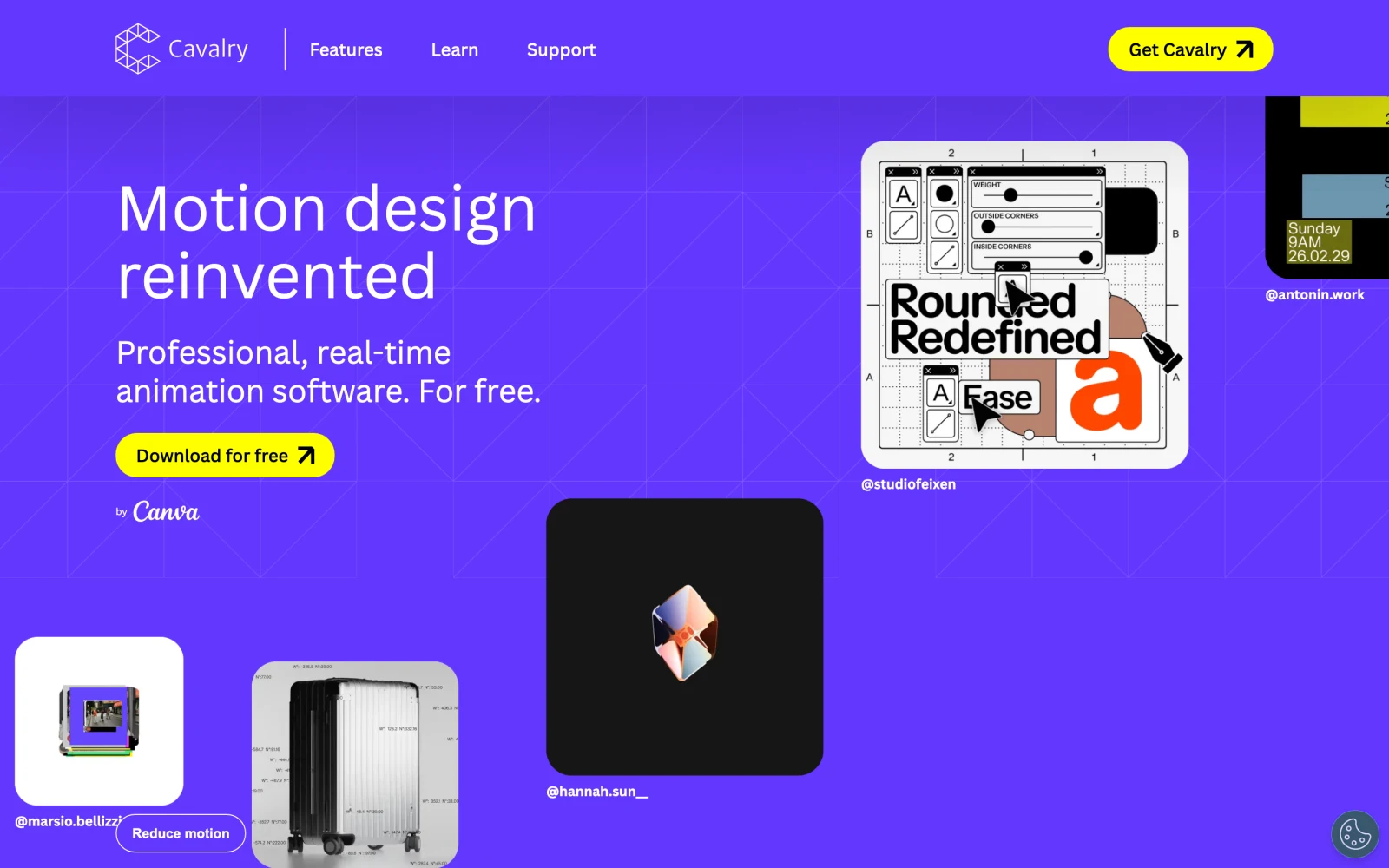
- Best for: 2D designers building kinetic type systems, HUDs, generative patterns, and CSV/Google Sheets charts.
- What stands out:
- Duplicators and falloffs animate hundreds of shapes or words without copying layers or coding.
- Free individual access includes the Render Manager with watermark-free ProRes 4444 / 4444 XQ alpha export (set Background Alpha to 0 and enable Alpha).
- Fast real-time playback on dense vector rigs.
- Limits:
- Requires signing in with a free Canva account.
- Focused on 2D/2.5D—not 3D modeling or camera editing.
- Attribute wiring takes adjustment after traditional timelines.
- Pricing: $0 for individuals and Canva Education; Enterprise SSO via Canva Enterprise.
- Skip it if: You want one-click social templates or camera editing in the same window.
3. DaVinci Resolve Fusion: best for free node-based motion graphics inside an editor
Fusion is the node-based motion graphics and VFX workspace inside DaVinci Resolve. Drop a Fusion Composition onto your edit timeline, connect text, shape, particle, and 3D camera nodes, and watch updates over your cut with zero intermediate renders.
- Best for: Editors on macOS, Windows, or Linux already cutting in Resolve who want watermark-free titles and callouts.
- What stands out:
- Zero round-tripping between editing, Fusion graphics, Fairlight audio, and color—with native Linux support.
- Free version works with 8-bit formats up to Ultra HD (3840×2160) at 60 fps (Blackmagic), and the Deliver page can export with an alpha channel (Frame.io guide).
- Custom macros expose text and color sliders on Resolve’s Edit tab.
- Limits:
- Node flowcharts feel slower than stacked layers for staggered typography.
- 10-bit video, frame rates up to 120 fps, resolutions beyond 4K, and Studio’s AI tools require the paid Studio version.
- Pricing: Free at $0; DaVinci Resolve Studio is $295 one-time ($236 promo on November 18, 2026).
- Skip it if: You cut in Premiere or Final Cut and dislike node graphs.
4. Rive: best for interactive UI animations and state machines
Rive is an interactive design and animation editor built to ship live graphics into iOS, Android, Flutter, React, Unity, and Unreal apps rather than static MP4s. Designers rig vectors, bones, and state machines so UI components react to taps, hover states, and live app data.
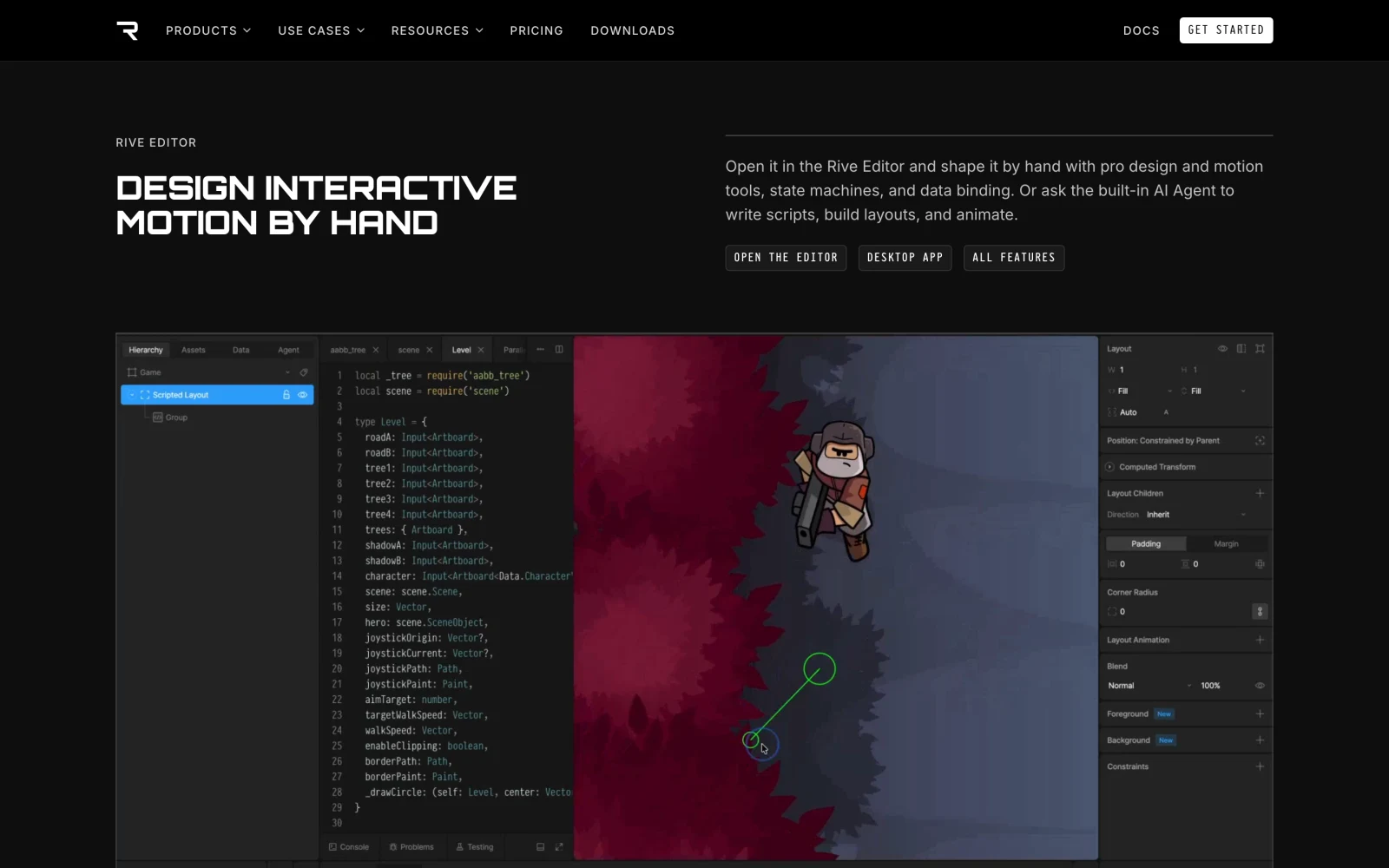
- Best for: Product designers, frontend engineers, and game UI teams shipping interactive
.rivanimations. - What stands out:
- State Machines and Data Binding wire artwork directly to runtime numbers, strings, and triggers.
- Tiny
.rivfiles stay sharp with native artboard transparency across mobile, web, and game engines. - Runs on web, macOS, and Windows, plus a local CLI.
- Limits:
- Free
.rivexports show a Rive splash screen, and Cloud Renderer video exports (MP4, WebM, GIF, PNG sequence) require a paid plan. - The Cloud Renderer outputs H.264 MP4, WebM, GIF, and PNG/SVG sequences; H.264 MP4 can’t carry transparency, so plan overlays around another format.
- No multi-track camera timeline.
- Free
- Pricing: Free ($0, 3 collaborative files, 50 CLI publishes/month); Cadet from $9/seat/month billed annually; Voyager $32/seat/month.
- Skip it if: You only deliver linear YouTube or broadcast videos.
5. Jitter: best for animating Figma layouts in a browser
Jitter is a browser motion tool built around a Figma plugin that imports frames with intact layer hierarchy. UI designers and SaaS marketers apply preset entrances, custom easing curves, and artboard transitions in a browser tab.
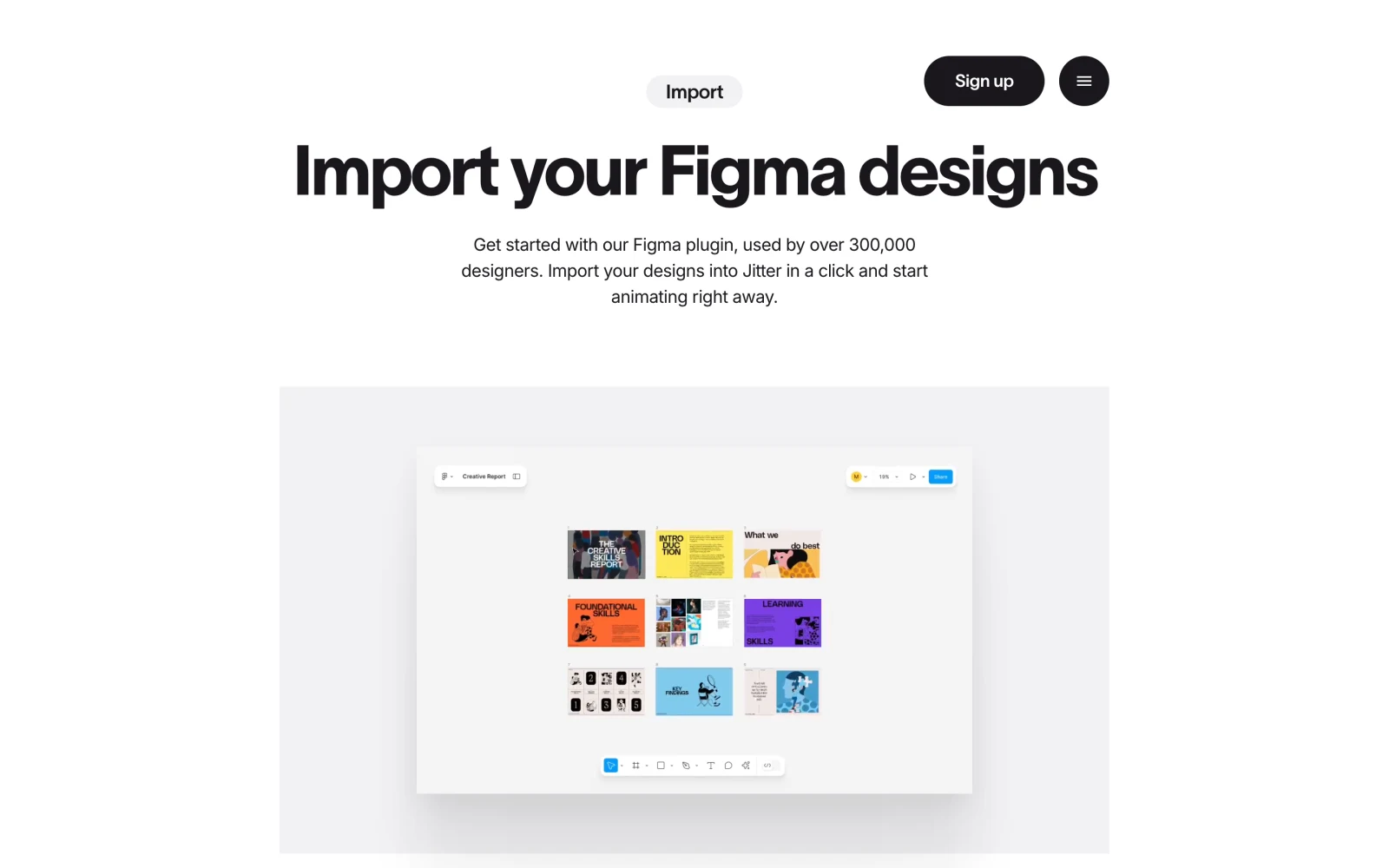
- Best for: Product marketers and UI designers turning Figma mockups into launch clips, ads, and Lottie files.
- What stands out:
- Figma plugin preserves auto-layout structure, fonts, and vectors.
- Action-based timeline staggers UI cards and cursor callouts faster than raw keyframes.
- Exports MP4, GIF, Lottie, and (on paid tiers) 60–120 fps ProRes and WebM in the browser.
- Limits:
- Free plan caps exports at 720p / 30 fps with a Jitter watermark, 3 workspace files, and 20 MB uploads.
- Transparent export is excluded from Free and Pro—it requires Max or a higher tier.
- Browser-only; not built for camera editing or 3D.
- Pricing: Free ($0, watermarked 720p); Pro (1080p 60 fps, free for verified students/educators) and Max (4K 120 fps + transparent export) are billed per editor—check current pricing.
- Skip it if: You need affordable alpha overlays or offline desktop editing.
6. ChatCut: best for motion graphics from a sentence
ChatCut is an AI video editor for the web, macOS, and Windows where you describe a title, lower third, or chart in plain language and an agent places an editable motion graphic onto a real multi-track timeline. Each graphic exposes text, font, and color controls in the Motion Graphics Editor so you revise copy without regenerating pixels.
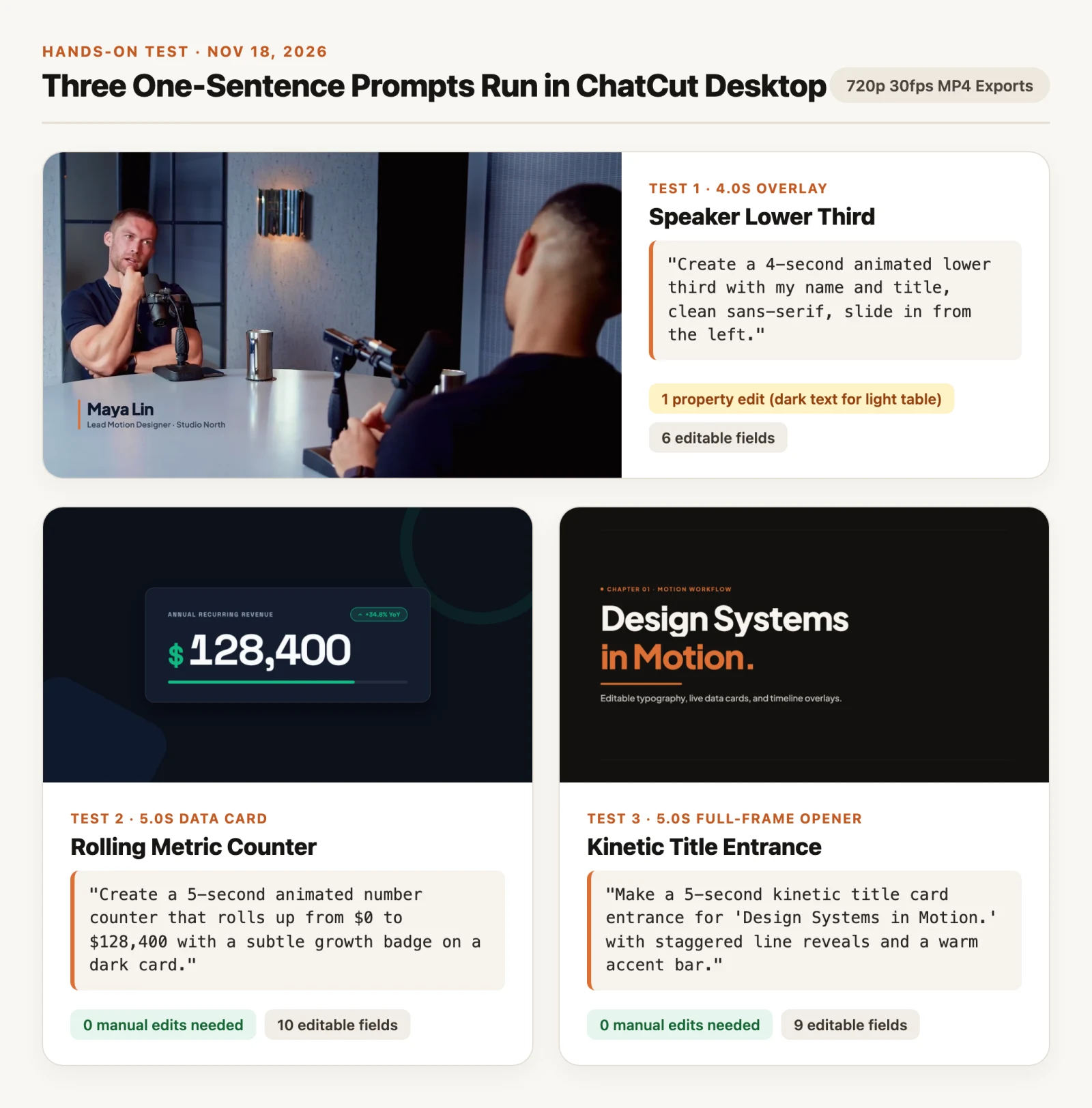
In our November 18, 2026 Desktop test (1920×1080 30 fps timelines, exported at 720p), we gave three one-sentence prompts to an external AI agent connected to our Desktop app, which built each graphic on the timeline. A 4-second speaker lower third ("Maya Lin · Lead Motion Designer · Studio North", 6 editable fields) over podcast footage needed 1 property change—darkening text colors to #0F172A and #334155 against a silver-grey tabletop. A 5-second counter rolling from $0 to $128,400 (10 editable fields) and a 5-second staggered title card ("Design Systems in Motion.", 9 editable fields) both passed with 0 manual edits. Running from an external MCP agent and rendering locally used 0 account credits (external agents use your Claude Code or Codex plan for reasoning; the built-in AI panel bills account credits by model usage).
- Best for: Video editors, marketers, and creators adding custom titles, lower thirds, and counters on a timeline without keyframing.
- What stands out:
- One-sentence prompts create timeline graphics with directly editable text, colors, and placement.
- Runs on web, Desktop (macOS 13+ and Windows 10+ x64 with local 4K export), or via Claude Code, Codex, and WorkBuddy.
- Manual cutting, transcription, captions, and standard MP4/WebM exports use zero credits.
- Limits:
- Needs an internet connection (no offline mode), has no Linux app, and the Agent Plugin runs in Claude Code, Codex, and WorkBuddy desktop apps—not on ChatGPT’s or Claude’s websites.
- Built-in Agent requests use credits, AI video/image generation needs a paid plan, and standalone transparent ProRes 4444 export (
Export → Graphics) requires Pro; Free cloud exports cap at 60 cumulative minutes and 1080p (Desktop local export bypasses that quota and supports 4K). - No
.aep/.mogrtimport-export or Bezier speed-graph rigging.
- Pricing: Free plan with starting credits; Pro starts at $25/month (100 credits) or $252/year and unlocks ProRes 4444 graphics export.
- Skip it if: You need offline editing, Linux support, or hand-tuned graph curves.
7. Apple Motion: best one-time purchase for Final Cut Pro editors on Mac
Apple Motion is Apple’s real-time motion companion for macOS, built to publish customizable titles, transitions, and generators into Final Cut Pro. Instead of keyframing every property, you stack Behaviors—like Overshoot, Throw, and Sequence Text—for smooth Apple silicon playback.
- Best for: Final Cut Pro editors on Mac wanting a one-time-purchase tool for reusable 2D/3D title templates.
- What stands out:
- $49.99 one-time Mac App Store purchase—about two months of After Effects.
- Rigged parameters let editors edit text, drop zones, and colors inside Final Cut Pro.
- Native Apple ProRes 4444 alpha export and fast Metal rendering.
- Limits:
- macOS-only (Motion 6.4 lists macOS 26.6+), with no Windows, iPad, or web build.
- Smaller plugin and studio handoff ecosystem than After Effects.
- No permanent free tier; trial runs via a 1-month Apple Creator Studio new-subscriber offer.
- Pricing: $49.99 one-time, or bundled in Apple Creator Studio at $12.99/month ($129/year; $2.99/month for students/educators).
- Skip it if: You use Windows, collaborate with Premiere teams, or build data rigs.
8. Blender: best for free 3D motion graphics and Grease Pencil
Blender is the open-source 3D suite behind product reveals, broadcast openers, and 2D/3D Grease Pencil animation. With Geometry Nodes (procedural instancing and falloffs akin to Cinema 4D’s MoGraph), real-time EEVEE, and path-traced Cycles, it handles 3D motion work at $0.
- Best for: 3D motion designers and 2D/3D artists on Windows, macOS, or Linux wanting procedural control without subscriptions.
- What stands out:
- Geometry Nodes drive procedural grids, effectors, and 3D typography at zero cost.
- Native transparent film rendering (
Film → Transparent) exports RGBA PNG/OpenEXR sequences or alpha QuickTime/WebM with no watermarks or caps. - Free forever under GNU GPL across Windows, macOS, and Linux.
- Limits:
- Steepest learning curve here—shaders, cameras, and nodes are overkill for a flat lower third.
- Multi-line 2D typography feels clunkier than Cavalry or After Effects.
- Cycles 4K renders require a capable GPU.
- Pricing: $0 forever (GNU GPL open source, no sign-up).
- Skip it if: You only create flat 2D titles, UI walkthroughs, or quick social overlays.
9. Linearity Move: best for vector motion graphics across Mac and iPad
Linearity Move is a vector animation app for macOS, iPadOS (with Apple Pencil), and iOS that pairs with Linearity Curve and imports Figma and Illustrator files. Auto Animate interpolates transitions between static artboards, cutting manual keyframing for logos and promos.
- Best for: Illustrators and brand designers on iPad and Mac animating vectors without After Effects complexity.
- What stands out:
- Auto Animate generates smooth state-to-state transitions in seconds, with manual keyframe override.
- Native iPadOS app lets illustrators draw with Apple Pencil and animate on one device.
- Exports
.mov,.gif, and Lottie.jsonwith a Transparent Background toggle (Linearity notes a quick macOS Finder ProRes re-encode if After Effects drops alpha).
- Limits:
- Apple hardware only—no Windows, Android, Linux, or web app.
- The Free plan limits Curve and Move usage, includes 5 GB of storage and 2,000 welcome credits valid for 7 days, and offers only basic export options.
- Not built for spreadsheet charts or camera footage editing.
- Pricing: Free Starter ($0); Pro from $8/month billed annually ($10 monthly); Studio from $25/month billed annually.
- Skip it if: Teammates use Windows or you need procedural expressions.
10. Canva: best for quick template-led social graphics
Canva’s animation maker gives non-designers the fastest route to animated social posts, slides, and solid-background promo cards across web, desktop, and mobile. Pick a template, apply Brand Kit styles, click an entrance preset or Custom Path motion, and download an MP4 in minutes.
- Best for: Social managers, founders, and marketers producing standalone 9:16 or 16:9 animated posts without design training.
- What stands out:
- Large template library paired with Brand Kit fonts, palettes, and one-click Magic Animate presets.
- Runs across browsers, desktop apps, iOS, and Android for quick team review.
- Designs using only free assets download as watermark-free MP4s.
- Limits:
- No transparent MP4 video: Canva’s transparent-background download is a paid feature, and for motion it applies to GIFs (Canva Help).
- No Bezier speed graphs or per-character rigging, so presets can look generic.
- Crown-badged Pro elements add watermarks on Free accounts.
- Pricing: Free ($0); Canva Pro is a paid subscription—check current pricing.
- Skip it if: You need transparent ProRes/WebM overlays for Premiere, Final Cut, or Resolve.
Also Considered
- Maxon Cinema 4D: Commercial 3D motion-studio staple for MoGraph cloners and Redshift, though its subscription (check current pricing) is a big step up, so solo creators may want to start with free Blender.
- Remotion: Renders programmatic motion graphics from React/TypeScript—ideal for developers automating data videos (free for individuals and teams up to 3, from $25/seat/month for larger companies), without a visual canvas.
- CapCut: Handy for trend text presets inside a quick editor, with free basic exports and paid Pro tiers (check current pricing), but too template-bound for custom vector rigs.
- Plainly Videos: Batch-renders
.aeptemplates in the cloud from spreadsheets or APIs, while still requiring After Effects to build the original file.
How to Choose the Right Motion Graphics Tool
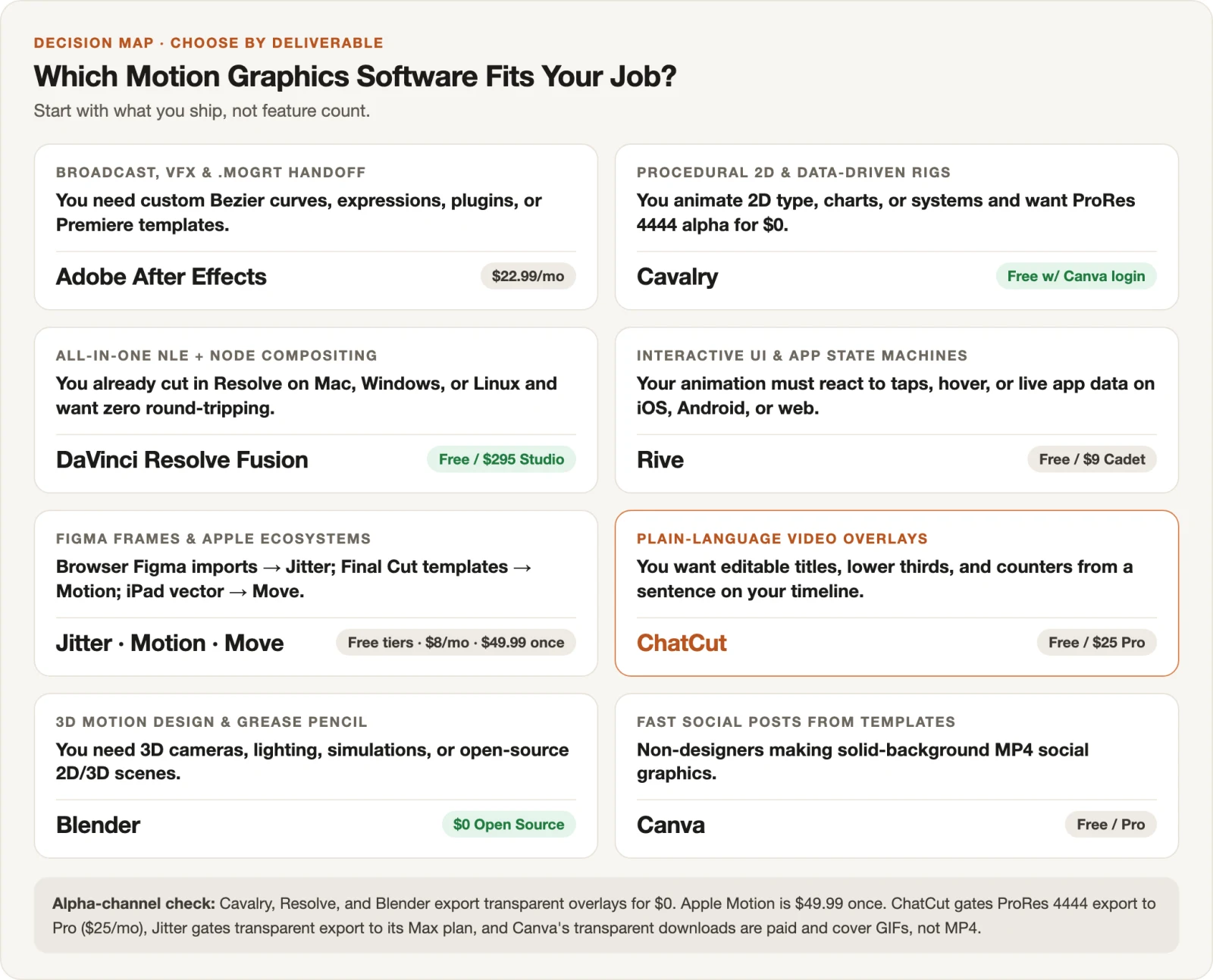
- If you deliver agency
.mogrtfiles, VFX shots, or custom speed-graph type, pick Adobe After Effects (see our After Effects motion graphics tutorial). - If you want $0 procedural 2D type, live-data charts, and ProRes 4444 alpha exports, pick Cavalry—or browse our After Effects alternatives guide.
- If you already edit in DaVinci Resolve on Mac, Windows, or Linux, build node graphics inside Fusion.
- If your animation must react to taps, hover states, or live app data, pick Rive.
- If your layouts start in Figma, pick Jitter (note that transparent export needs its Max tier); if you cut in Final Cut Pro, buy Apple Motion once for $49.99; if you animate vectors on an iPad, pick Linearity Move.
- If you need 3D cameras, lighting, simulations, or Grease Pencil scenes for $0, pick Blender.
- If you want editable titles, lower thirds, and counters from a sentence on your video timeline, use ChatCut—try the Motion Graphics skill, read our AI motion graphics generator guide, or check how to make motion graphics.